No description
- Go 100%
 Jonas Leder
9a034e093c
All checks were successful
CI / build-update-json (push) Successful in 19s
CI / build (arm64, linux) (push) Successful in 1m0s
CI / build (amd64, linux) (push) Successful in 1m35s
CI / build (amd64, windows) (push) Successful in 1m31s
CI / build (arm64, darwin) (push) Successful in 1m27s
CI / build (amd64, darwin) (push) Successful in 2m2s
CI / build (arm64, windows) (push) Successful in 1m43s
CI / upload-to-s3 (push) Successful in 21s
Co-Authored-By: Claude Sonnet 5.5 <noreply@anthropic.com> |
||
|---|---|---|
| .forgejo/workflows | ||
| api | ||
| configuration | ||
| docs | ||
| update | ||
| .gitignore | ||
| config.yaml.example | ||
| go.mod | ||
| go.sum | ||
| main.go | ||
| Readme.md | ||
| renovate.json | ||
| version.go | ||
Shelly Smoke to Alamos forwarder
This tool was developed to use the relativly cheap Shelly Plus Smoke detectors in combination with Alamos as alarming software. The smoke detector will trigger a webhook from the API server, which then will forward the alarm to Alamos.
Installation
- Download the latest version here: https://s3.jonasled.de/shelly-smoke-alamos/shelly-smoke-alamos-windows-amd64.exe
- Dowload the Non-Sucking Service Manager: https://nssm.cc/
- Register a new Windows Service for starting the forwarder in the background by calling
nssm install shelly-smoke-alamosusing powershell. - Configure the service like in the screenshot described. You can change the folder to any folder you like to use:
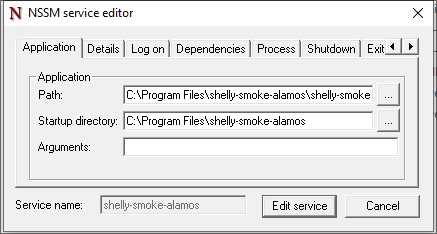
- Go into the Alamos FE2 webui and create a external connector:
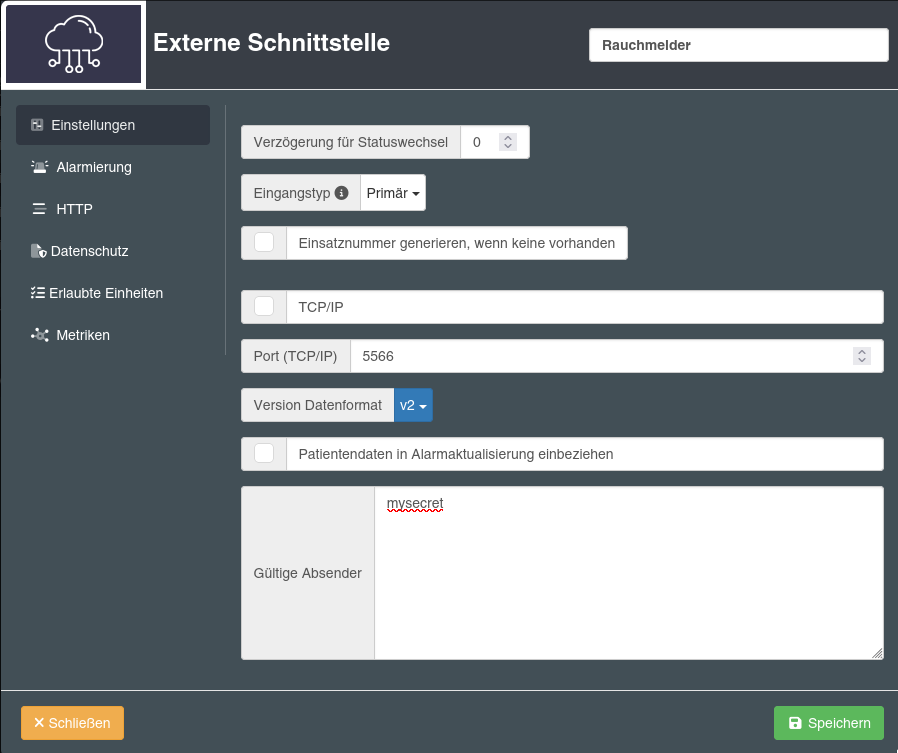
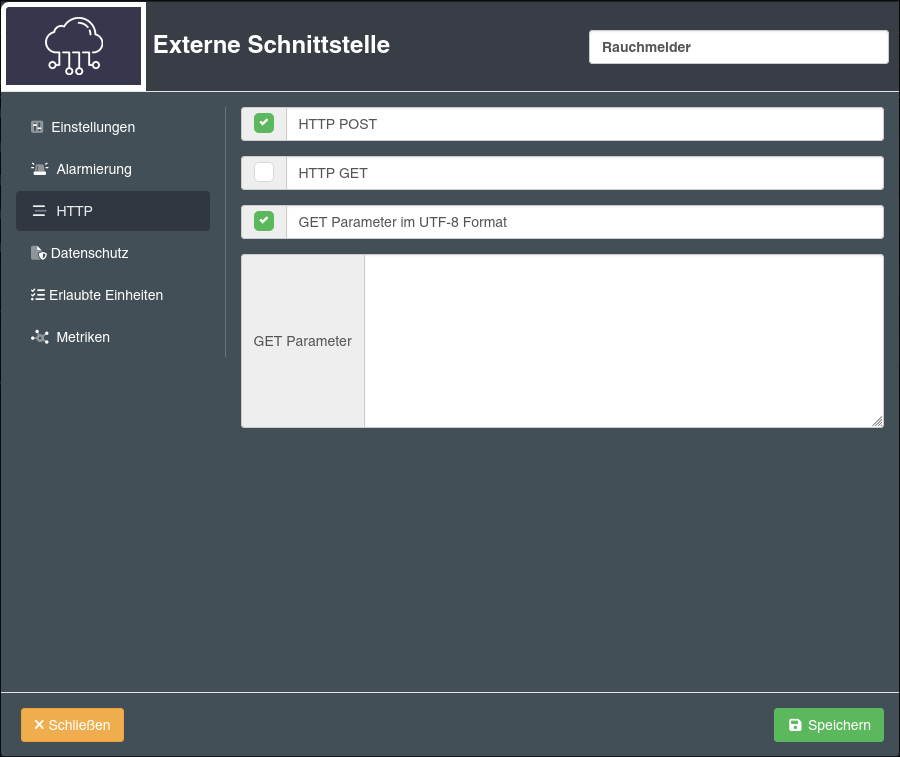
- Download the example config file from this repo (
config.yaml.example) and place it asconfig.yamlin the same folder as theshelly-smoke-alamos-windows-amd64.exefile. - Configure your alamos connection in the config file. The secret must be the same as the valid sender option on the FE2 configuration.
- Create your smoke detectors. As name you can use anything to identify the smoke detector in your alarm later. For the id use a random character string and for target select your alamos target configuration.
- Start the
shelly-smoke-alamoswindows service. - Allow connections from your smoke detectors to Port 8080 in you windows firewall.
- Configure your smoke detector to connect to your WiFi and add two automations:
- When smoke detected trigger this URL:
http://<ip of your server>:8080/api/webhook/<smokedetector id> - When the test button is pressed, trigger this URL:
http://<ip of your server>:8080/api/webhook/<smokedetector id>/test. When you're missing the test function in the automation, your smoke detector is running a older firmware release and you first have to update the sensor.
- When smoke detected trigger this URL: